

ALL BLOG POSTS
/
SEO
The Importance of H1, H2, and H3 in Website Design

Stefan Ivic
Author
When people think about website design, they usually focus on colors, layouts, and visuals. But one of the most important elements of a high-performing website is something much simpler: heading structure. H1, H2, and H3 tags are not just for styling text. They shape how users read your content and how search engines understand it.
What are H1, H2, and H3 tags?
Headings are HTML tags used to organize content on a web page in a clear and structured way. They create a hierarchy that helps both users and search engines understand what each section of a page is about. When heading tags are used correctly, they improve readability, navigation, and SEO performance.
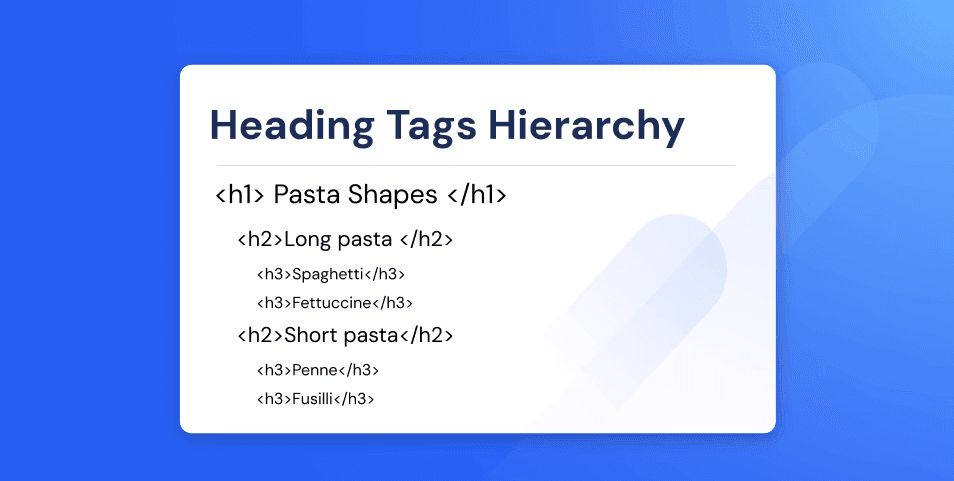
H1 is the main title of the page
H2 is used for major sections
H3 is used for sub-sections under H2
A simple way to understand headings is to think of a web page as a book. The H1 is the book title that tells you what the whole book is about. The H2 headings are the chapter titles that divide the book into main topics. The H3 headings are the sub-topics inside each chapter that explain details.
This kind of structure allows readers to quickly scan through the page, find what they are looking for, and move easily between sections. It also helps search engines understand how your content is organized and how different topics are connected.
H1 is the book title
H2 are chapter titles
H3 are sub-topics inside each chapter
Using H1, H2, and H3 correctly makes content easier to scan and easier to understand. Most website visitors skim content instead of reading every line. Clear headings guide their eyes and help them decide where to focus. This improves user experience, increases time on page, and reduces bounce rates.
From an SEO perspective, heading structure tells search engines which topics are most important. It makes your content more relevant and easier to index, which can improve your rankings in search results.
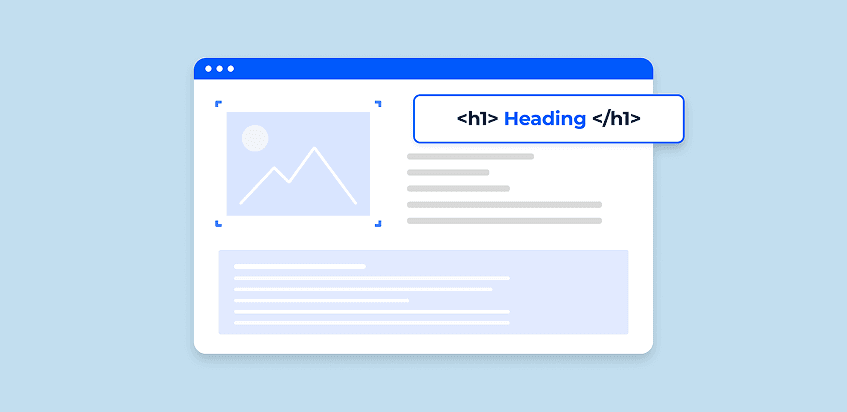
Why H1 is important
The H1 tag tells both users and search engines what the page is about. It is the most important heading on the page and acts as the main topic of your content. At Artonest Design Studio, we use strong, well-written H1 tags to make sure every page has a clear purpose and is optimized for the right keywords. A powerful H1 sets clear expectations for visitors and helps your page rank better in search results.
A good H1:
Clearly describes the main topic
Includes the main keyword
Matches the intent of the page
For example, if the page is about SEO services, a strong H1 would be:
“Professional SEO Services for Growing Businesses”
Every page should have only one H1. Using multiple H1 tags can confuse search engines and weaken SEO because it makes it unclear what the main topic of the page really is. A single, well-written H1 gives your page clarity, structure, and stronger search visibility.
Why H2 improves content structure
H2 tags divide your content into clear, logical sections. They act like signposts that guide readers through the page and help them quickly find the information they need. On long pages, H2 headings are especially important because they break large blocks of text into manageable and easy-to-scan sections.
For example, in a service page:
H2: On-Page SEO
H2: Technical SEO
H2: Content Optimization
Each H2 introduces a major topic, allowing users to jump directly to the section that interests them most. This improves user experience and keeps visitors engaged longer on your site. From an SEO point of view, H2 tags also help search engines understand the different subtopics covered on your page. They show how your content is organized and what each section is about.
Help search engines understand subtopics
Improve keyword relevance
Increase chances of ranking for related terms
Good H2 headings make your page more structured, more readable, and more SEO friendly. At Artonest, we use clear H2s to turn long pages into organized, scannable content instead of one big block of text.
Why H3 makes content easier to read
H3 tags break H2 sections into smaller, more focused parts. They allow you to explain details, features, or steps without making the content feel overwhelming. This creates a smooth reading flow and makes complex topics easier to understand.
This structure lets readers scan through the H3 headings to quickly see what topics are covered inside each section. If someone only wants information about meta descriptions, they can find it instantly without reading everything.
Makes long pages easier to read
Helps users find specific details
Improves accessibility and usability
For blogs and service pages, H3 is perfect for explaining steps, features, benefits, or processes in a clean and organized way. It keeps your content easy to follow while also helping search engines better understand the depth and relevance of your page.
SEO-Friendly Website Structure
A well-structured website is the foundation of strong SEO. Search engines rely on clear heading hierarchy to understand what your content is about and how different topics are connected.
Why Heading Structure Matters in SEO
Using H1, H2, H3, and other heading tags correctly helps search engines read your website more easily. It also improves how users navigate and understand your content.
How Search Engines Read Your Page
Google scans headings first to identify the main topic and important subtopics. When headings are organized properly, your page becomes more relevant to search queries and easier to rank.
Role of Keywords in Headings
Placing SEO keywords naturally inside H1, H2, and H3 tags tells search engines what each section of your content is focused on. This improves keyword relevance and search visibility.
Impact on User Experience
Clear headings guide visitors through the page, reduce confusion, and keep them engaged longer. This leads to better interaction and lower bounce rates, which supports SEO.
Why This Improves Rankings
When users stay longer and find what they need quickly, search engines see your site as more valuable. This increases your chances of ranking higher in organic search results.
How headings help SEO
Search engines use headings to understand what your page is about and how different parts of your content are related. When you use H1, H2, and H3 tags correctly, you create a clear content hierarchy that helps Google and other search engines read, index, and rank your page more effectively.
The H1 tells search engines the main topic of the page. H2 and H3 tags support that topic by explaining related subtopics and details. This structure makes it easier for Google to understand the context of your content and match it to relevant search queries.
Google can read your page more easily
Your keywords are placed in important positions
Your content becomes more relevant to search queries
At Artonest Design Studio, well-structured H1, H2, and H3 headings help your content qualify for featured snippets and rich results, giving your website greater visibility, stronger SEO performance, and higher search engine rankings.
How headings improve user experience
Most people do not read web pages word for word. They scan. Headings guide their eyes and help them quickly understand what the page contains. Clear H1, H2, and H3 tags allow users to move through your content easily and find what they are looking for without feeling overwhelmed.
Good heading structure:
Makes content easy to scan
Reduces bounce rate
Keeps visitors engaged longer
When users find what they want quickly, they stay on your site longer, explore more pages, and are more likely to take action. This leads to better engagement, higher conversions, and stronger overall website performance.
Common mistakes to avoid
Many websites use headings only for visual styling instead of for proper content structure. This is one of the most common SEO and usability mistakes. When headings are used incorrectly, search engines struggle to understand the page, and users find it harder to navigate the content.
Avoid:
Using multiple H1 tags on one page
Skipping heading levels (H1 → H3 without H2)
Using headings only to make text big
Not using keywords naturally in headings
Always use headings for structure first, and then apply visual styling with CSS. This creates a clean and organized web design that is easy for users to read and navigate. It also helps search engines understand your content better, making your website more SEO friendly. A well-structured page improves both user experience and search engine rankings.
Final thoughts
H1, H2, and H3 are not just formatting tools. They are a core part of SEO, accessibility, and user experience. When used correctly, they help search engines understand your content, help users find information faster, and improve the overall performance of your website.
A well-structured page:
Ranks better in search results
Reads better for visitors
Converts better by guiding users through the content
If you want your website to perform well, start by fixing your heading structure. It is one of the easiest and most powerful improvements you can make, and it can have a direct impact on traffic, engagement, and conversions.
Frequently Asked
Questions
1. What are H1 to H6 tags?
2. Why is the H1 tag important for SEO?
3. How should H2 and H3 tags be used?
4. Can a page have multiple H1 tags?
5. How do heading tags improve user experience?
Recent


