

ALL BLOG POSTS
/
UI Design
The Future of AI in UI/UX Design: Navigating the New Era of Digital Product Creation

Sandip Dhameliya
Author
The integration of AI into UI/UX design is more than a trend; it’s a paradigm shift. From generative interfaces to predictive user research, AI is automating workflows and personalizing experiences. At Artonest Design Studio, we explore how designers can leverage AI to build more intuitive, high-performing digital products.
The design industry is currently standing at a crossroads. For decades, the process of creating digital interfaces was a manual, iterative labor of love—moving pixels, conducting long-form user interviews, and hand-coding design systems. Today, the "Future of AI in UI/UX Design" is no longer a speculative topic for sci-fi enthusiasts; it is the reality currently sitting on every designer’s desktop.
As a Senior UI/UX Designer at Artonest Design Studio, I’ve seen firsthand how AI isn't just changing how we design, but what we design. We are moving away from static layouts toward dynamic, living interfaces that adapt to users in real-time.
In this guide, we will break down the seismic shifts occurring in the industry, the tools you need to know, and why the human element remains the most critical component of the design process.
What is AI in UI/UX Design?
AI in UI/UX Design refers to the integration of machine learning (ML), natural language processing (NLP), and generative algorithms into the product design lifecycle. It involves using intelligent systems to automate repetitive tasks (like resizing assets), analyze massive datasets for user insights, and generate design variants that optimize for specific user behaviors.
In essence, AI serves as an "intelligent co-pilot" for designers. It handles the data-heavy and logic-based heavy lifting, allowing human designers to focus on high-level strategy, empathy, and creative problem-solving.
How is AI changing UI Design?
AI is shifting UI design from a "fixed asset" model to a "generative" model. Instead of designing a single dashboard for all users, AI allows for AI UI Design—where the interface components, colors, and layouts change based on an individual’s accessibility needs, preferences, or intent.
How is AI changing UX Design?
In the realm of AI UX Design, the focus is moving from observation to prediction. AI can analyze user paths in real-time to predict where a user might drop off, allowing designers to proactively adjust the flow. It streamlines UX Research by synthesizing thousands of user feedback points into actionable themes in seconds.
Will AI replace UI/UX designers?
No. While AI can generate layouts and analyze data, it lacks the ability to understand nuanced human emotion, ethical implications, and complex business goals. The future belongs to the "Centaur Designer"—a human who uses AI to augment their own capabilities.

Why AI is Transforming Digital Products
The transformation isn’t just about speed; it’s about relevance. In the past, UX was "one-size-fits-most." Today, users expect hyper-personalization.
Efficiency at Scale: AI can generate 100 variations of a landing page for A/B testing in the time it takes a human to design one.
Data-Driven Empathy: AI identifies patterns in user frustration that might be invisible to the naked eye, leading to more empathetic AI Product Design.
Lowering the Barrier to Entry: Concepts can move from a text prompt to a high-fidelity prototype in minutes, accelerating the AI Product Development cycle for startups.
How AI is Changing UI Design
Visual design is the most visible area of AI impact. We are seeing a move toward Generative AI Design, where the software itself suggests layout structures based on established design principles.
1. Generative Layouts and Grids
Tools are now capable of generating entire UI screens from text prompts. While these often require human refinement, they provide a massive head start. This is particularly useful in AI dashboard design, where complex data visualization layouts can be suggested based on the data types provided.
2. Adaptive Visual Systems
Imagine a UI that switches to high-contrast mode automatically for a user with visual impairments, or shifts its navigation style for a power user vs. a first-time visitor. This is the heart of AI Interface Design.
3. Automated Asset Creation
AI-driven tools for icon generation, background removal, and image upscaling have saved designers thousands of hours, allowing them to focus on the UI design services that actually drive business value.
How AI is Improving UX Design
Artificial Intelligence in UX is a game-changer for the "invisible" side of design.
1. Predictive User Behavior
By using historical data, AI can predict the "Next Best Action" for a user. This reduces cognitive load and makes the AI User Experience feel intuitive, almost as if the app knows what you want before you do.
2. Real-time UX Audits
AI agents can now scan a Figma file or a live website to identify accessibility violations, inconsistent spacing, or broken user flows, providing instant feedback to the design team.
3. Conversational UI and Natural Language
The rise of LLMs (Large Language Models) has made Conversational UI a primary interface. We are moving away from buttons and menus toward intent-based design, where the user simply tells the product what they want to achieve.
Popular AI Design Tools Used by Designers
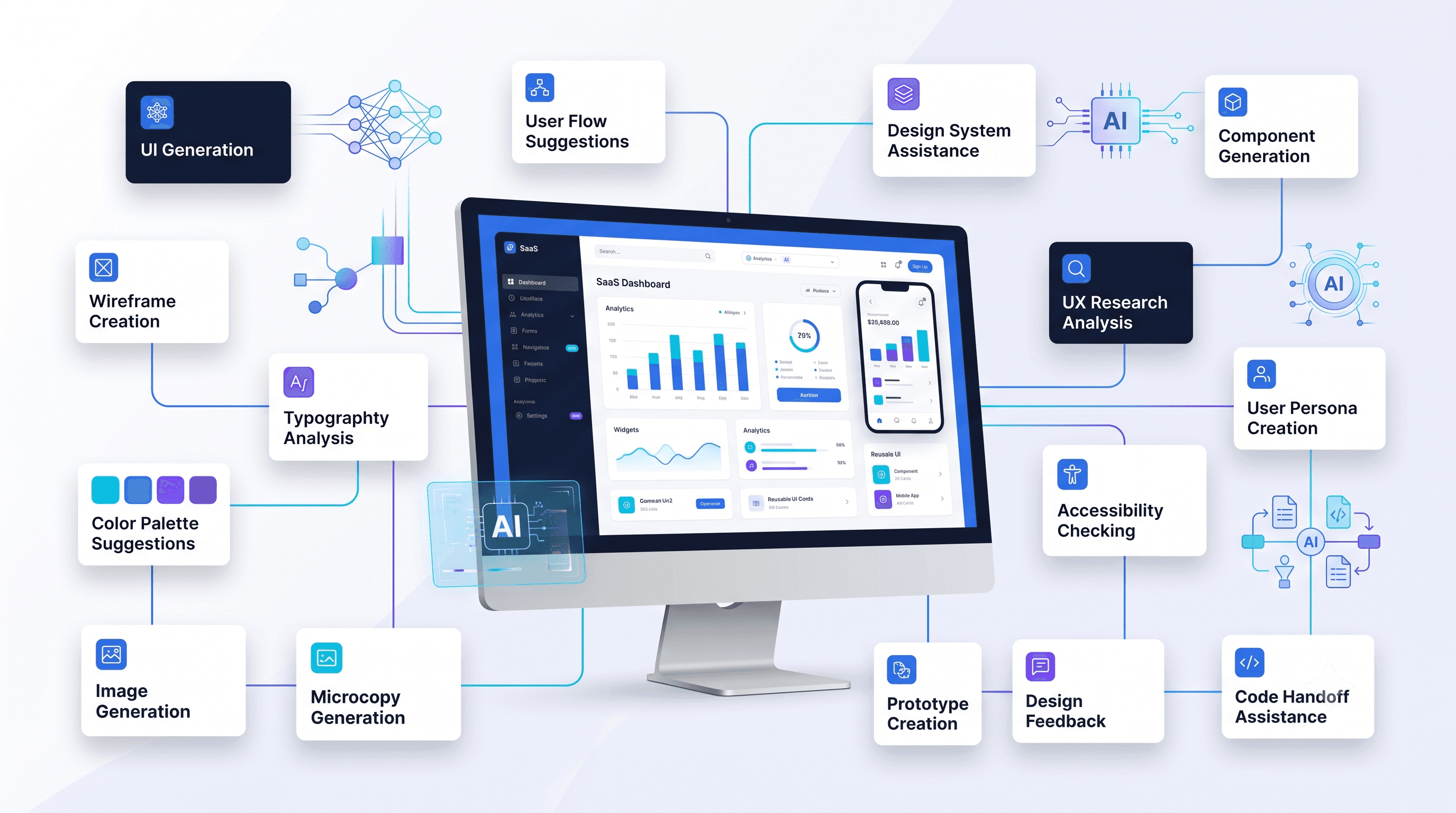
At Artonest Design Studio, we integrate a variety of AI tools into our AI Workflow Design to ensure we are delivering the most modern solutions to our clients.
Figma (AI Features): With the acquisition of Diagram and new native AI features, Figma is making it easier to generate components and organize layers.
Relume: An incredible tool for site-mapping and wireframing using AI to generate sitemaps and components in seconds.
Midjourney / DALL-E 3: Essential for high-end visual exploration and mood boarding.
Attention Insight: Uses AI heatmaps to predict where users will look before the product is even launched.
Looppanel: Automates the synthesis of user research calls, turning hours of video into categorized insights.
Benefits of AI in Product Design
The integration of AI in Product Design offers three primary competitive advantages for businesses:
Reduced Time-to-Market: By automating the "grunt work," teams can ship features faster.
Increased Consistency: AI can enforce design system rules across thousands of screens, ensuring a unified brand experience.
Deep Personalization: Products that adapt to user needs have higher retention rates and better conversion.
Challenges and Limitations
Despite the hype, AI is not a magic wand. There are significant hurdles to consider:
The "Hallucination" Problem: AI can sometimes suggest UI patterns that are visually pleasing but functionally broken or inaccessible.
Homogenization of Design: If everyone uses the same AI models to generate UI, all apps start to look the same. Maintaining a unique brand identity requires human intervention.
Data Privacy: Using user data to train AI models for UX personalization requires strict adherence to GDPR and ethical standards.
Lack of Context: AI doesn't know your business's specific "Why." It doesn't understand the office politics, the specific budget constraints, or the long-term vision of a CEO.
Future Trends (2026–2030)
What does the next decade hold for Human AI Collaboration?
Agentic UX: We will stop designing "pages" and start designing "actions." AI agents will navigate interfaces on behalf of users.
Neuro-Inclusive Design: AI will automatically adjust interfaces for users based on their cognitive load and sensory preferences.
Real-time Design Generation: Interfaces will be built on the fly. If a user needs a specific tool that doesn't exist, the AI will generate the UI for that tool in the moment.
Generative Design Systems: Design systems will no longer be static libraries but living organisms that evolve as the brand and user base grow.
Skills Every Future UI/UX Designer Should Learn
To stay relevant, designers must evolve into AI Product Designers. This means learning:
Prompt Engineering for Design: Learning how to communicate with AI models to get the best visual and structural outputs.
AI Ethics & Bias Mitigation: Understanding how to spot and correct biases in AI-driven UX.
Data Literacy: Being able to interpret the data that AI provides to make informed design decisions.
Curation and Art Direction: As AI produces more volume, the designer’s job becomes one of a "curator"—picking the best results and refining them.

Industries That Will Benefit Most
SaaS & Enterprise: Automating dashboard design and complex workflows.
Healthcare: Personalized patient portals that adapt to medical history.
E-commerce: Hyper-personalized shopping journeys based on real-time intent.
Fintech: Using AI to simplify complex financial data and predict user spending patterns.
Best Practices for Using AI in Design
If you are a product design leader looking to integrate AI, follow these rules:
Always Keep a Human in the Loop: Never ship AI-generated designs without a thorough manual review.
Focus on the Problem, Not the Tool: Don't use AI just because it's trendy. Use it because it solves a specific friction point in your workflow.
Prioritize Accessibility: Ensure AI-generated code and layouts meet WCAG standards.
Test with Real Humans: AI-simulated testing is a great start, but it can never replace the feedback of a real person using your product.
Common Mistakes to Avoid
Over-reliance on AI: Letting the tool dictate the creative direction.
Ignoring Brand Voice: AI often defaults to "generic," which can dilute your unique brand identity.
Neglecting Edge Cases: AI is great at the "happy path" but often fails to design for errors or unusual user scenarios.
Real-world Examples and Mini Case Studies
We recently worked with a Fintech startup to redesign their analytics platform. By using AI to categorize user behavior, we realized that 80% of users only used 3 specific metrics. We used AI Workflow Design to create a dynamic dashboard that prioritizes these metrics based on the time of day and the user’s role.
Result: 40% increase in user engagement.
Example: Generative UI in E-commerce
A major retailer used AI to generate unique landing page layouts for users based on their browsing history. If a user was a "minimalist," the UI stripped away extra banners. If they were a "deal seeker," the UI highlighted discounts.
Result: 15% boost in conversion rates.
Conclusion
The Future of AI in UI/UX Design is not a threat; it is a superpower. It allows us to move faster, think deeper, and design products that feel more human, not less. By automating the mundane, we free ourselves to tackle the truly difficult design challenges of our time.
At Artonest Design Studio, we don't just follow trends; we set them. We combine the precision of AI with the strategic insight of world-class designers to build products that resonate.
Frequently Asked
Questions
1. How does AI improve the accessibility of digital products?
2. Is AI-generated UI legally protectable?
3. What is the difference between AI and Automation in UI/UX?
4. Can AI help with UX writing?
5. How should a startup begin incorporating AI into their product design?
Recent


